
Tidinest
A mobile app that helps families manage shared calendars and coordinate their daily routines.
It also allows users to plan meals, create collaborative lists, and set smart reminders and notifications.
My role
Product designer
Timeline
2 months (2025)
Responsibilities
Ideation, user research, wireframing, prototyping
Tools used
Figma, Illustrator
overview
Problem
Families struggle with multiple schedules and often find it hard to stay organised and coordinate daily routines effectively.
They want to find a simpler, more collaborative way to stay organised together.
The goal
To provide a centralised, family-friendly app that simplifies everyday planning and coordination.
The app lets families stay in sync, making it easier to manage schedules, communicate, and build organised routines together.
Solution
An app that is…

Key features

Dashboard
The home screen gives a clear and visual overview of all app features, helping the user quickly view the daily schedule and navigate from one central screen.

Daily, weekly, monthly overview
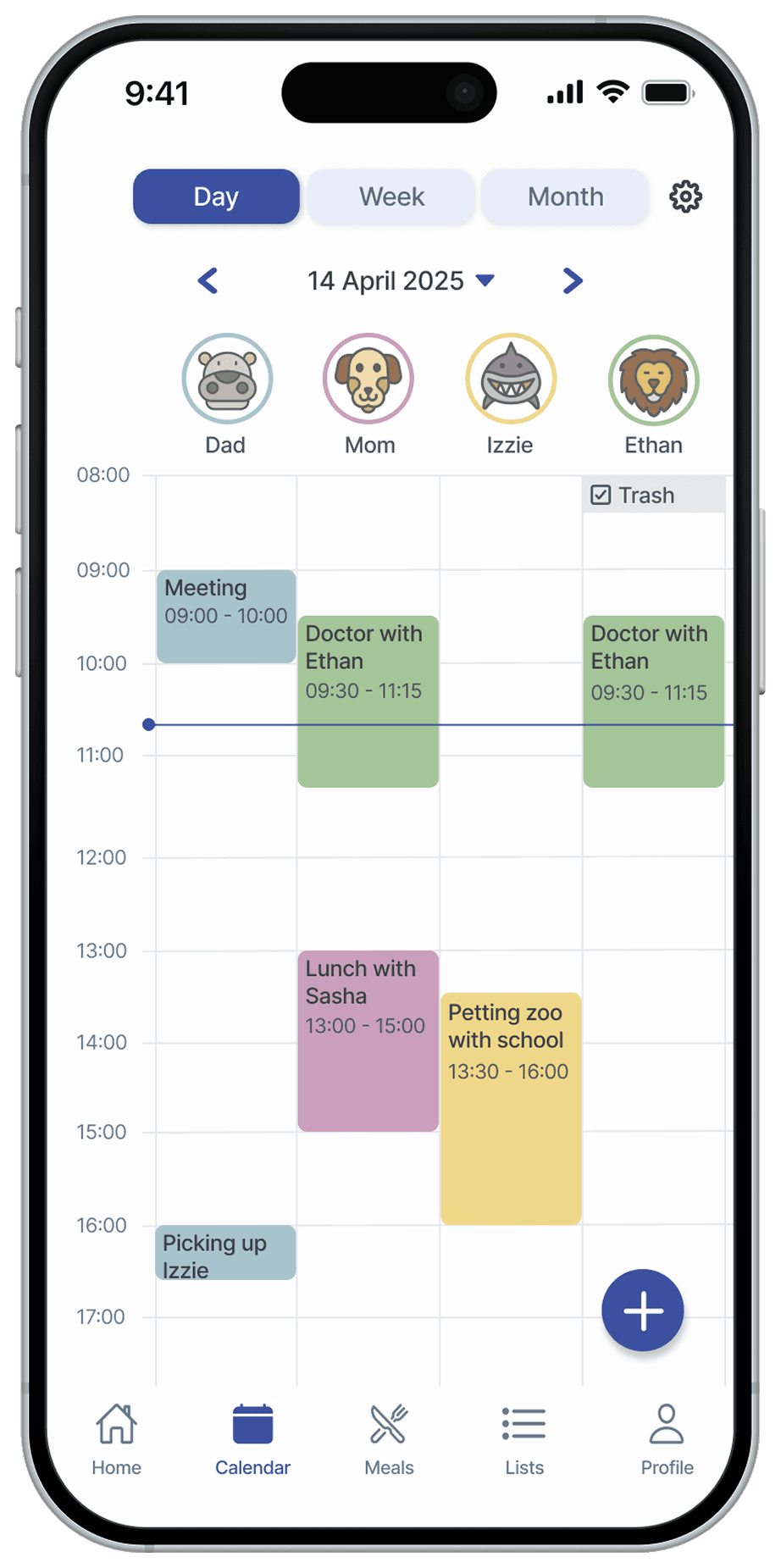
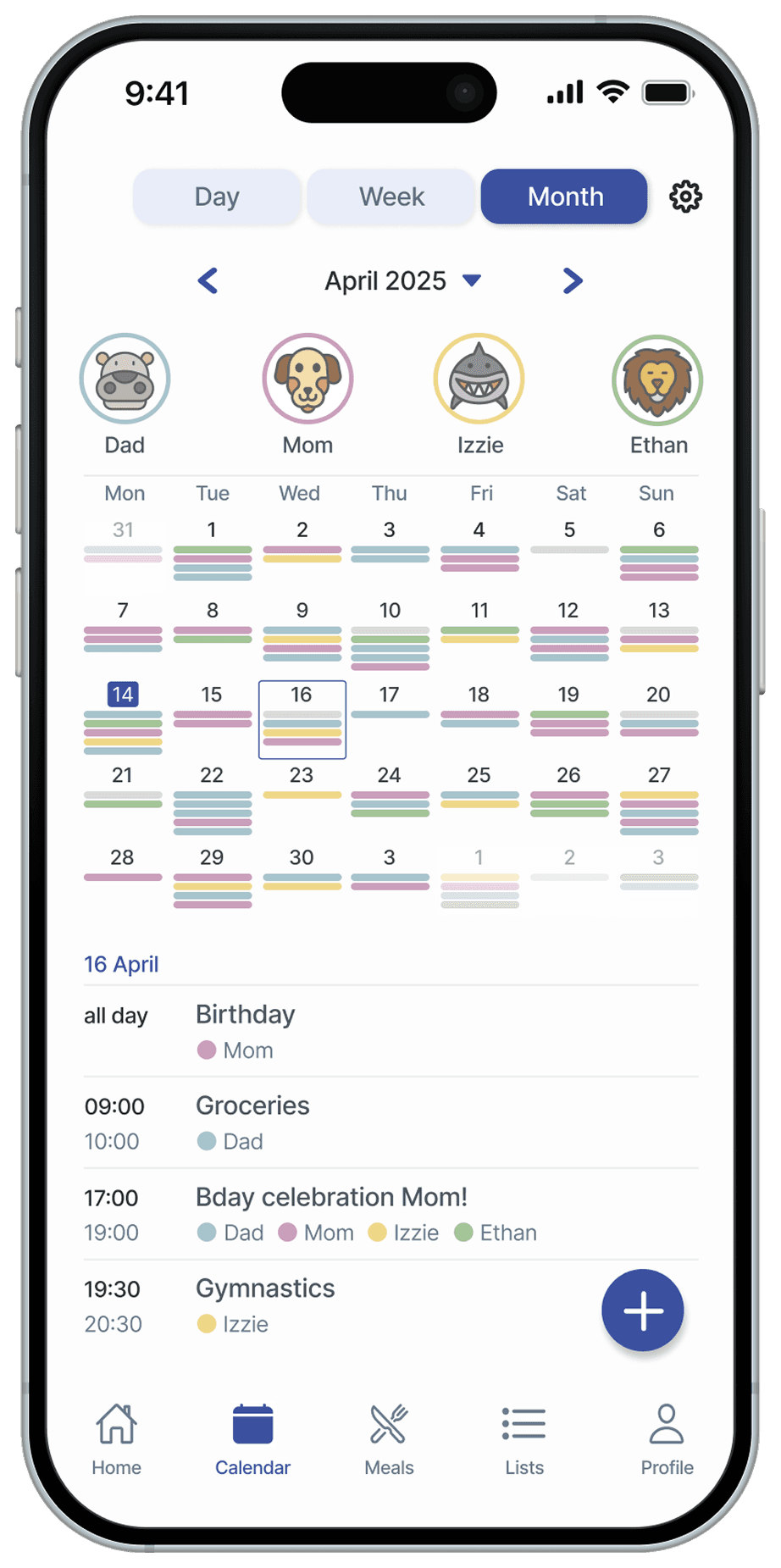
The shared calendar offers daily, weekly, and monthly views with color-coded events, making it easy for families to coordinate plans and activities.

Meal planner
The meal planner helps families to plan their weekly meals by combining recipes and schedules in one space.

Lists
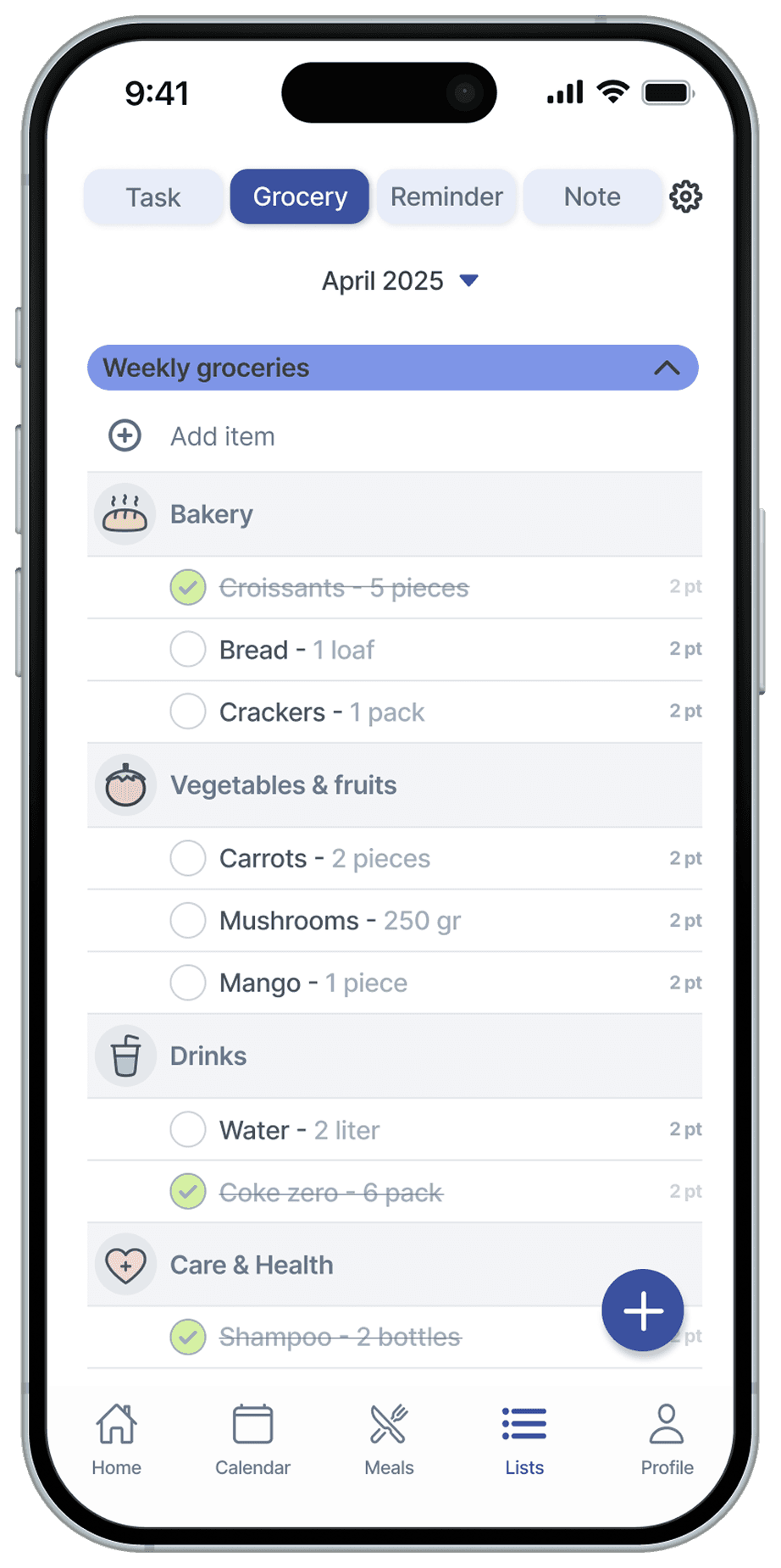
With Lists, families can manage groceries, household tasks, to-dos, reminders, and notes in one organised place.
Final design

research
Methodologies
User insight research, personas and journey mapping.
User insight research
I conducted qualitative research by exploring online forums and discussion platforms. I focused on threads where users shared which apps and tools they use to coordinate family schedules, tasks and routines.
By analysing these conversations, I gathered insights into common frustrations, feature requests, and workarounds families use in their daily lives.
Common pain points
1
Fragmented tools and communication
Families often rely on multiple apps, physical calendars, and conversations to coordinate their schedules, making it difficult to keep everyone aligned.
2
Overlapping or missed appointments
Without a shared overview, important events or tasks are forgotten or double-booked.
3
Communication is not effective
Communication between parents, children, and partners is often inconsistent, leading to misunderstandings and friction.
4
No support for building routines
Many families struggle to build and maintain regular routines such as chores, meal planning, and schedule planning.
The challenge
How might we design a family-friendly app that brings schedules, tasks, and routines into one clear and collaborative space?
Personas
To better understand the needs, behaviours, and frustrations of modern families, I created user personas based on research insights. These personas represent key family roles and helped guide design decisions.
Saul

Age: 42
Family: married, 2 kids (age 9 & 12)
Occupation: social worker
“My kids are my everything. I want to take good care of them.’’
About
Saul is a busy working father of two who struggles to manage the complexity of family life, including planning and coordination, while keeping his family organised. He is looking for better ways to manage the family’s daily schedule and routine.
Goals
Have easy access to his children’s schedules
Organise daily schedules, tasks and reminders
Wants more effective communication with his family
Receive updates about upcoming events or changes in plans
Plan more family activities
Involve his kids in planning routines and chores
Frustrations
They have a shared physical calendar at home but he can’t access it at work
He often doesn’t know where his kids are
Communication with the kids is not efficient
Relies on too many different tools to manage their family life
He often forgets appointments
Inez
Age: 12
Family: child
Occupation: elementary student
“I wish my dad would stop nagging me about daily tasks’’
About
Inez is a 12-year-old elementary student who wants to be more independent. She often forgets the household chores and tasks she needs to do. She wants to find a simple way to see her daily schedules and responsibilities.
Goals
Communicate her plans efficiently
Know her own schedule without having to ask
Find more motivation to do tasks
Help her parents with grocery shopping
Find a simple way to invite her parents and siblings to her activities
Feel more involved in the family’s planning
Frustrations
She dislikes being constantly asked about her plans by her parents
She find tasks boring and feels unmotivated
Most of the time she isn't aware of the family schedule of the day
She feels nagged by her parents when communication becomes repetitive
User journey maps
Saul
Goal: keep his family organised and reduce daily planning stress.

Inez
Goal: to know what to do each day and feel more independent.

design
Ideation
Key features
Dashboard
- Clear overview of all app features
- Check the schedules and routines in one glance
- PersonalisedCalendar
- Daily, weekly and monthly overview
- Clear overview of each family member
- Colour codedMeal planner
- Weekly overview
- Built-in recipe collection
- Colour codedLists
- Create unlimited lists for different purposes
- Subcategories
- Option to hide and show lists
Key additions
Add and manage family members
Set reminders for events and tasks
Send invitations to other members
Assign tasks and receive notifications
Create different types of lists
Personalise the app with custom settings
Choose a personal avatar
Wireframes
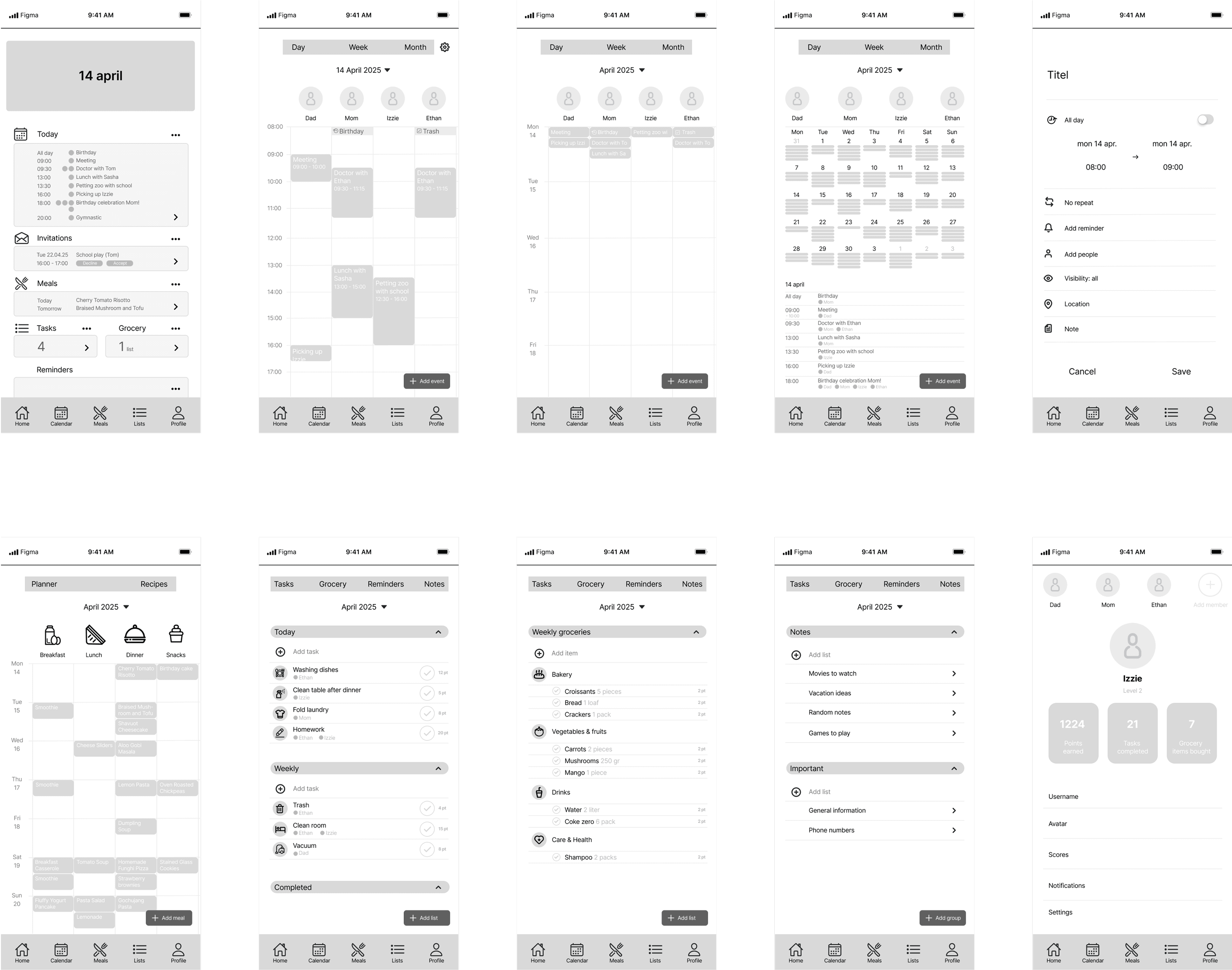
User testing insights
Dashboard
Make the dashboard look more appealing and user friendly
Add button
Improve the add button for better clarity and easier use
Layout
Optimise the layout with more spacing
Visual identity
Concept
The visual identity is family-oriented, combining playful visuals with a clean and intuitive design.
Logo

Tidinest
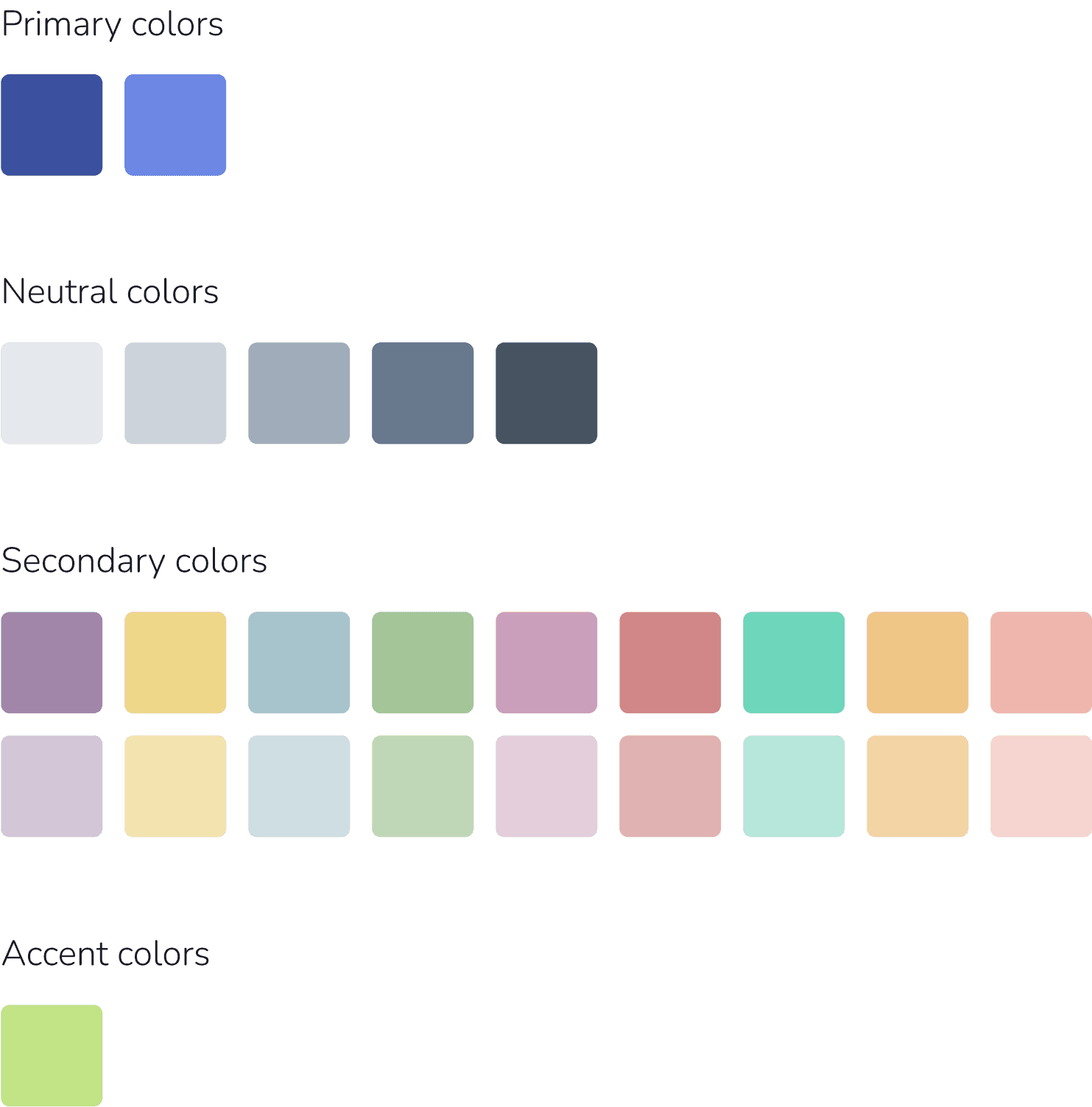
Color palette
Iconography

Typography
Inter Regular
Inter Medium
Final design






retrospective
Reflection
This was my first time designing a mobile app, which gave me a valuable opportunity to learn mobile design and practice my UX research skills.
Next steps
The next step is to create interactive prototypes and conduct usability tests with potential users, using their feedback to refine the design.
thanks for reading!
